
Skip to content
Projects

Your Brain Thinks in Percentages, Not Sixths

Side Project
Primary linkView on GitHubhttps://github.com/BipinRimal314/drift
Your Brain Thinks in Percentages, Not Sixths
When a clock says :30, it doesn't feel like half. Not to me, anyway. ADHD brains struggle with base-60 time. Minutes are arbitrary subdivisions that don't map to how we actually think about proportion. We think in percentages: progress bars, battery levels, loading screens. Our intuition is decimal, not sexagesimal. So I built a clock that speaks the language my brain already understands.
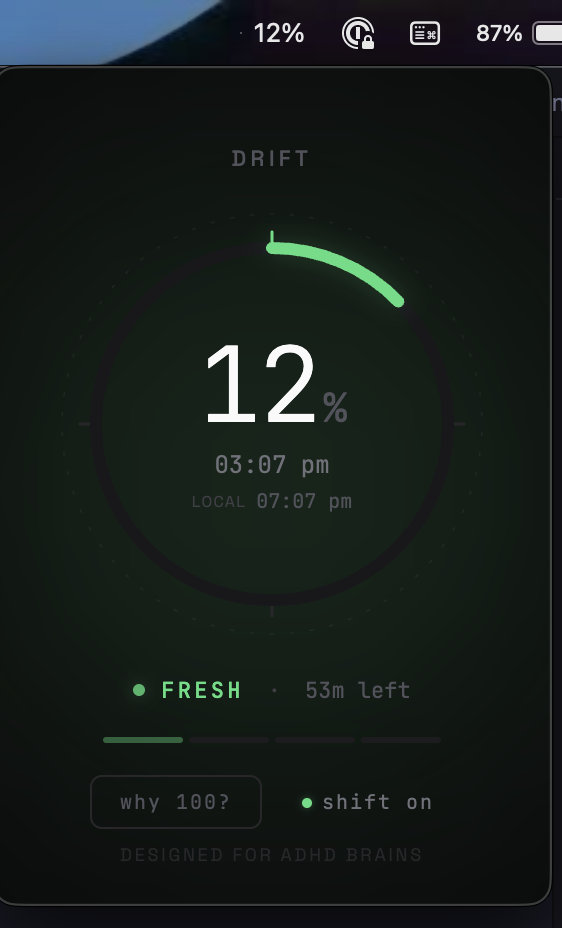
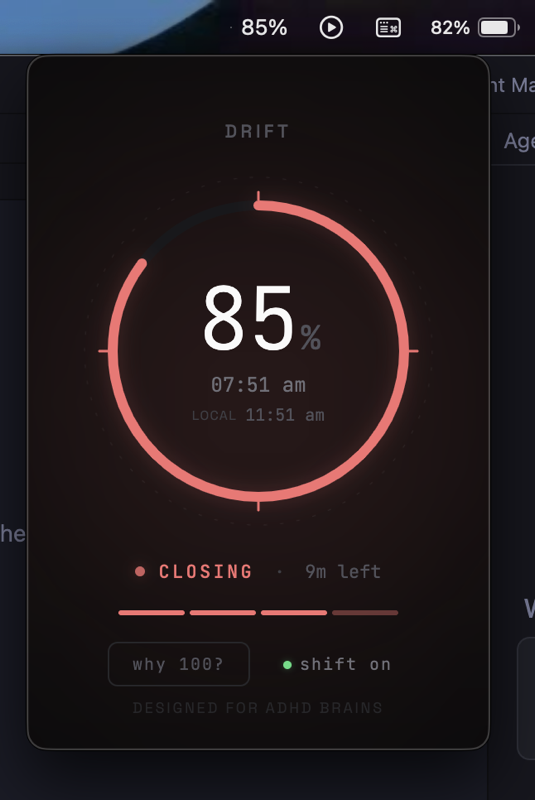
It lives in the macOS menubar. No icon; just a number like 63%. That's it. You glance up, you know you're roughly two-thirds through the hour. No mental math. No counting minutes. Just proportion. Click the number and a dark floating panel opens:
  • A circular progress ring that fills as the hour progresses
  • Color-coded phases: green (fresh, 0–25%), yellow (flowing, 25–50%), orange (ticking, 50–75%), red (closing, 75–100%)
  • The actual clock time as secondary info
  • Minutes remaining in the hour
  • A subtle flash at each quarter boundary to keep you anchored
The insight is simple: 1% of an hour = 36 seconds. Every 36 seconds, the number ticks up by one. Your brain does the rest.
Text-only menubar. Most menubar apps fight for attention with icons. Drift uses a transparent 1x1 pixel icon so only the percentage shows. Less visual noise, more useful information. Dark theme only. The panel is a floating dark surface that looks right in both light and dark macOS modes. JetBrains Mono for the percentage display, Space Grotesk for labels. The typography matters: this is something you look at dozens of times a day. No framework overhead. The renderer is vanilla HTML/CSS/JS. Electron is already heavy enough. The panel doesn't need React to update a number every second. Phase labels, not just colors. "Fresh" at 12%, "ticking" at 63%, "closing" at 82%. The words reinforce what the color is telling you. Redundant signals are good when the goal is intuitive awareness.
The original was Electron: 95MB binary, 100MB RAM, 2-3 second startup. Functional, but embarrassing for an app that displays one number. The native rewrite is Swift/SwiftUI with AppKit for the menubar integration. The numbers tell the story:
MetricElectronNative
Binary95MBunder 5MB
Memory~100MB~20MB
Startup2-3sunder 200ms
CPU idle0.1-0.5%Undetectable
19x smaller. 5x less memory. The app is invisible to the system, which is exactly what a menubar utility should be. Hybrid architecture: NSStatusItem (AppKit) for the menubar text because SwiftUI's MenuBarExtra can't do custom dark transparent panels. NSPanel subclass for the frameless floating window. SwiftUI views inside via NSHostingView. The best of both frameworks, each doing what it does well.
Base-60 is a historical accident. Babylonian astronomers liked the number 60 because it has many divisors. That's a good reason for mathematicians. It's a terrible reason for someone trying to feel whether they have time to start another task before the meeting. Percentages aren't more accurate. They're more felt. And for people whose executive function depends on intuitive time awareness, felt is what matters. Download: GitHub Release (v2.0.0) | Source: GitHub | License: MIT