
Skip to content
Projects

Your Body Speaks Before Your Mouth Does

Side Project
Your Body Speaks Before Your Mouth Does
DAWYM analyzes what you say and how you say it. The Teleprompter helps you deliver a script without losing your place. But every speaking coach I've ever worked with spends half their evaluation on something neither tool measures: what your body is doing. "Stop swaying." "Use your hands." "Look at us, not the floor." "You're fidgeting with your ring again." Vanessa Van Edwards' research at Science of People found that viewers who watched only the first seven seconds of TED Talks rated speakers nearly identically to those who watched the full talk. Your body speaks before your mouth does, and the audience decides if they trust you before you finish your opening sentence. No consumer tool measures this. PowerPoint's Speaker Coach checks if you're visible on camera and calls it a day. Yoodli does voice analysis. Orai counts filler words. VR platforms like VirtualSpeech simulate audiences but don't analyze your actual movement. The closest thing is uSpeek, which evaluates 11 body language criteria from your webcam, but it's early-stage and upper-body only. So I built the evaluator that watches every second, never forgets a fidget, and tracks your progress over weeks.
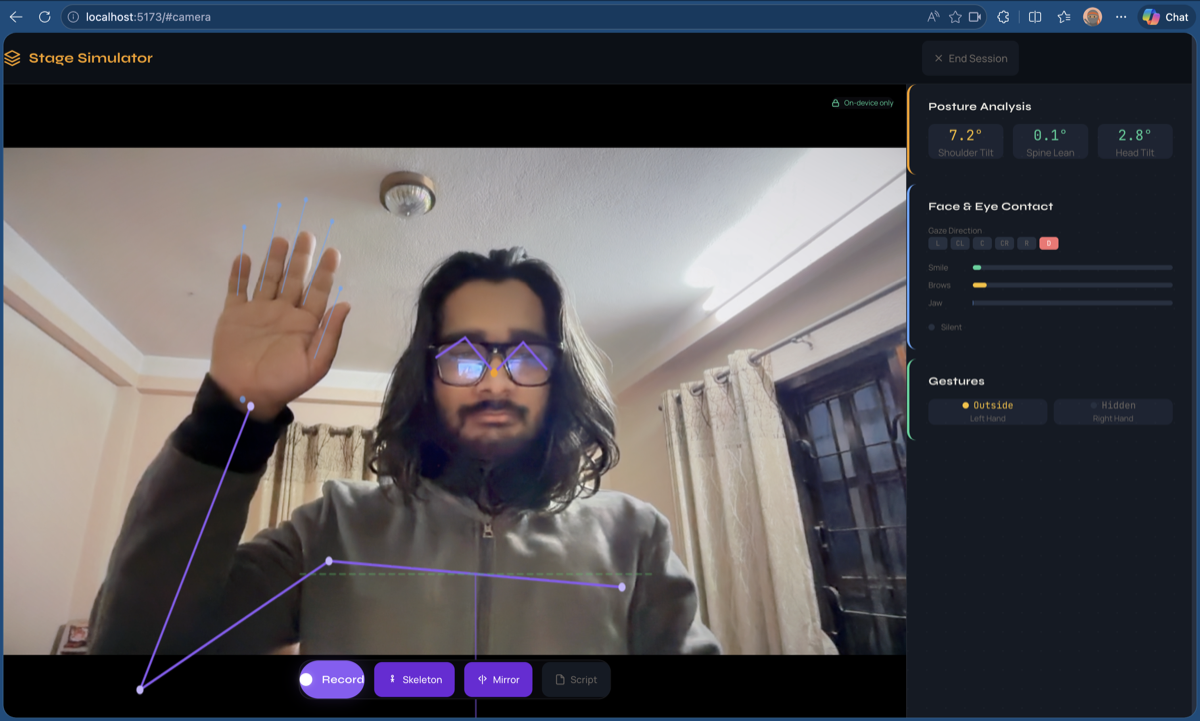
You open the app in your browser and grant camera access. Three MediaPipe models load (cached after first download, about 18MB total):
  • Pose Landmarker: 33 body keypoints. Shoulders, elbows, wrists, hips, knees. This is how the app knows if you're swaying, slouching, or standing with your weight on one foot.
  • Face Landmarker: 478 facial landmarks plus 52 blendshapes. This tracks eye direction (are you looking at the camera or down at notes?), facial expression (are you engaged or frozen?), and micro-expressions.
  • Hand Landmarker: 21 landmarks per hand. This distinguishes between an open illustrative gesture (good) and fidgeting with your watch (not good).
All three models run simultaneously in a Web Worker on an OffscreenCanvas, keeping the main thread free for the UI. On Apple Silicon, this hits 15-25 combined frames per second. No audio or video leaves your device. No server. No API calls. Apache 2.0 licensed models running entirely in your browser.
Synthesized from Toastmasters Pathways evaluation criteria, TED coaching methodology, Nick Morgan's Power Cues, and Van Edwards' research: Eye Contact. 50-70% audience-facing is good. 70-90% is excellent. Below 50% reads as disengaged or nervous. The app tracks gaze direction and classifies each frame as audience-facing, down-gaze, or averted. Gesture Quality. The "Clinton Box" (shoulder-to-shoulder, chest-to-waist) is the optimal gesture zone. Below the waist reads as tentative. Above the shoulders reads as erratic. The app tracks hand position relative to torso and scores whether your gestures are in the zone. Movement. Purposeful movement (taking two steps to mark a transition) is different from swaying in place. The app tracks your center of mass over time and distinguishes intentional repositioning from nervous oscillation. Posture. Shoulder alignment, spinal angle, weight distribution. Are you standing tall or collapsing into yourself? Is your weight centered or shifted to one hip? Expression. Facial engagement: are your eyebrows, mouth, and eyes contributing to your message, or is your face a mask? The blendshape data reveals whether you're smiling, frowning, raising eyebrows for emphasis, or maintaining a flat affect. Stillness. The anti-fidget score. Self-touching (face, hair, jewelry), repetitive hand movements, weight shifting, pen clicking. The app detects these patterns and tracks their frequency.
This is where it connects to everything else I build. Level 1: Foundation. Eliminate distractors. Stop swaying. Stop fidgeting. Keep your hands visible. Look at the camera. The app flags every occurrence and shows you the count. You're not trying to be a great speaker yet. You're trying to stop being a distracting one. Level 2: Intentional Basics. Maintain posture for a full minute. Use gestures in the Clinton Box. Hold eye contact for 3-5 second intervals. These are specific, measurable targets. Level 3: Integration. Coordinate gesture with speech rhythm. Move purposefully to mark transitions. Vary your facial expression. The scoring combines dimensions instead of evaluating them independently. Level 4: Mastery. Everything is flowing. The scores are high across all six dimensions simultaneously. This is the level where body language stops being a checklist and starts being presence.
While building this, I realized the measurement engine doesn't care what skill it's scoring. MediaPipe tracks body position. The scoring rubric decides what "good" means. For a speaker, good posture means shoulders back, weight centered, facing forward. For a dancer, good posture means something entirely different depending on the style. But the measurement is the same: 33 keypoints, their positions, their movement over time. The same app that coaches you to stop swaying during a presentation could coach you through a salsa basic or a bharatanatyam stance. Different scoring rubric, same underlying technology. Different definition of "correct," same act of making the invisible visible. I haven't built the dance mode yet. But the architecture is already there.
Body language norms vary. Americans expect strong eye contact; in many East Asian cultures, sustained direct gaze toward authority figures is disrespectful. Southern European speakers use larger gesture amplitudes than Northern European speakers. Personal space expectations differ across the Middle East, South Asia, and the West. A body language coach that hard-codes American presentation norms and applies them globally is not a universal tool. It's a culturally specific tool pretending to be universal. Stage Simulator has adjustable cultural profiles that shift the scoring thresholds: eye contact percentage, gesture amplitude, movement range, personal space. You train for the audience you'll actually face, not the audience a Silicon Valley product team imagined.
Stage Simulator is the third piece of a public speaking training suite:
AppWhat It CoachesLayer
DAWYMVoice, language, argumentationAudio + NLP
TeleprompterScript delivery, pacingText + timing
Stage SimulatorPosture, movement, gestures, eye contactVision + ML
Three apps. Zero overlap. Together: structure your speech, read it with confidence, and deliver it with presence. Phase 6 integrates all three into a combined session where you get voice, body, and content analysis simultaneously. Stack: React 19, Vite, TypeScript, Tailwind v4, MediaPipe Pose/Face/Hand Landmarker, Web Workers, OffscreenCanvas.