Every teleprompter app I tried wanted something from me before it would scroll text.BIGVU wanted $19/month and capped the free tier at two minutes. Speakflow wanted an account. PromptSmart wanted $10/month for voice tracking that, according to its own App Store reviews, "jumps well ahead of where you are in the script or simply stops tracking." CuePrompter was free and accountless but looked like it was built when Flash was still a reasonable technology choice.I write my scripts in markdown. Every one of these apps stripped my formatting on paste. Section headers became plain text. Cues to myself disappeared. Stage directions merged into speech. The one tool I found that actually understood markdown was last updated years ago.So I did the thing you do when every option costs too much, does too little, or breaks your workflow: I built my own.
What It Does
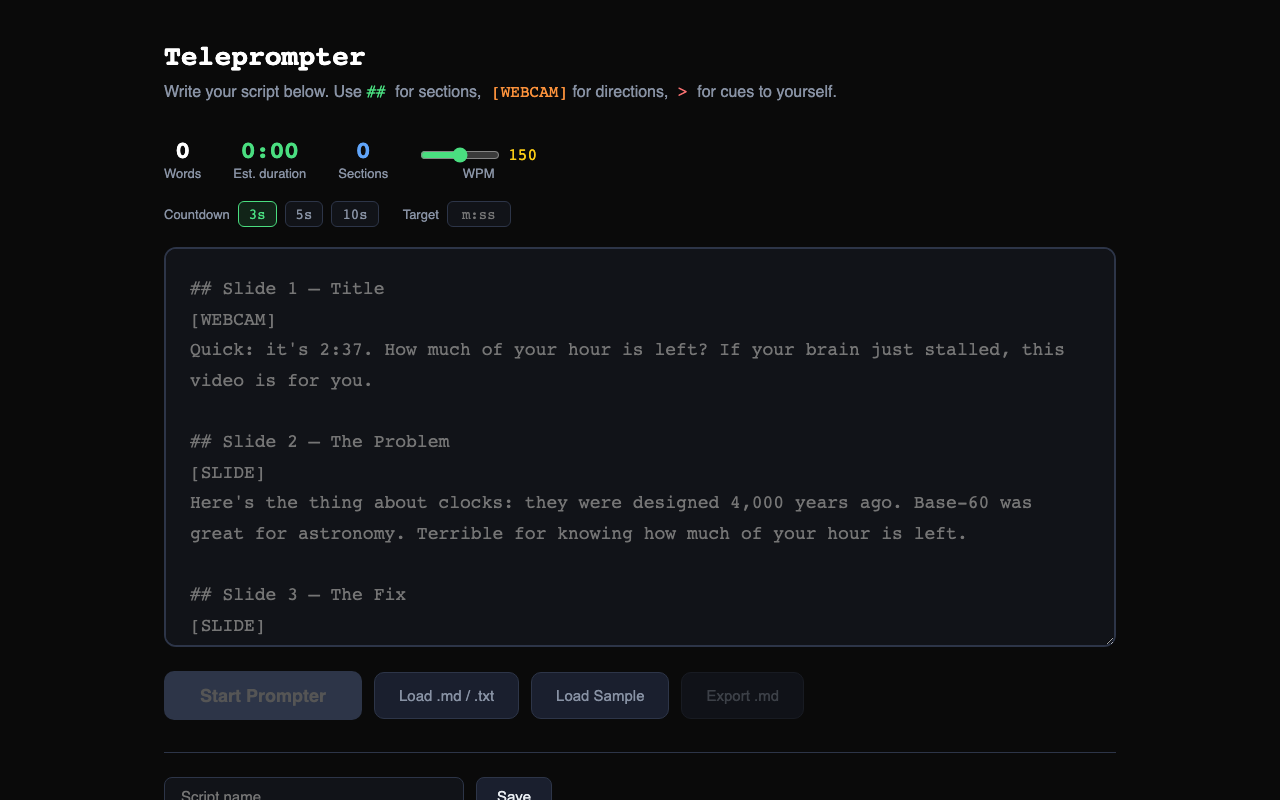
You paste a markdown script. It parses it into blocks: ## becomes a green section marker, [WEBCAM] becomes an orange stage direction, > becomes a red cue to yourself, and everything else becomes white speech text. Hit Start, and it scrolls.That's the pitch. Here's what makes it not-annoying:The scroll engine doesn't stutter. Most web-based prompters update position through React state on every animation frame. That's 60 state updates per second, which means 60 full re-renders per second, which means jank on any script longer than a page. I moved the scroll to direct DOM manipulation and throttled the HUD to 5fps. The text moves at 60fps; the word counter updates at 5fps. Your eyes can't tell the difference. The CPU can.The speed calibrates to your pace. Set your WPM in the editor (or type a target duration like 2:30), and the scroll speed calculates from your content height and estimated duration. No more "scroll too fast, scroll too slow, give up and wing it."Section navigation. Press 1 through 9 to jump to any section. When you flub a line in take four and need to get back to section three, you press 3. Not "scroll scroll scroll, was it here? No, too far, scroll back."Rehearsal mode. Press P and it shows one section at a time, no scrolling. Step through with Space. Practice delivery before you commit to recording. Thomas Frank recommends doing one take reading, then one from memory. This makes the first take structured.Focus spotlight. Press O and everything outside a narrow strip around the guide line dims to near-black. Reduces the cognitive load of seeing upcoming text while trying to deliver the current line naturally.Retake markers. Press B to drop a bookmark. Press J to jump back to it. The marker shows as a yellow tick on the progress bar. When you know you'll need to redo a section, mark it before you move on.
The Design Decisions
Markdown is the format. Not rich text, not a proprietary script format, not "paste your Google Doc and hope." If you write in Obsidian, VS Code, or any text editor, your script works here without modification.No account, no server, no tracking. Scripts live in localStorage. Nothing leaves your browser. The entire app is a static site hosted on GitHub Pages. There is no backend to compromise, no database to breach, no analytics to opt out of.Three themes, three fonts. Dark (white on black, the default), High Contrast (green on black, for bright rooms or aging monitors), and Light (dark on cream, for the rare person who prefers it). Sans, Serif, and Mono. Press T and D to cycle. These aren't cosmetic; readability at arm's length is a functional requirement for a teleprompter.Column width matters. Thomas Frank's top tip for looking natural on a teleprompter: narrow the text column so your eyes don't visibly scan left to right. Press W to cycle from 40% to 90%. The narrower the column, the less your audience notices you're reading.PWA. Install it on your tablet from the browser. It works offline. No App Store, no review process, no $99/year developer account.
What I Learned
The teleprompter market is $78.5 million. That's not a big market by tech standards, but it's big enough that dozens of companies are fighting over it. Every one of them gates features behind subscriptions. Every one of them requires an account. And every one of them strips your formatting on paste.The positioning that nobody occupies: markdown-native, no-account, open-source. Three properties that are individually common but rarely coexist. Open-source teleprompters exist (QPrompt is excellent) but they're desktop apps. No-account web teleprompters exist (CuePrompter) but they haven't been updated in years. Markdown teleprompters were proposed in 2010 (Brett Terpstra coined "PromptDown") but nobody built one properly.I did. In a weekend. The interesting question isn't why I built it; it's why nobody else did.
Status
Live and open source. Using it for my own video recordings. Phase 3 (voice-activated scroll, dual-screen operator mode, session analytics) will come if other people start using it.Try it:bipinrimal314.github.io/teleprompterSource:GitHub