This is my original tutorial, republished on this website. The examples are preserved. Tool versions and interfaces may have changed.
Encryption is the process of encoding information. The process is simple. We convert the original data (also known as the plaintext) into an encoded form (also known as ciphertext). The encoded form does not give useful information unless decoded. When we require the data, we perform decryption. We decrypt the ciphertext into the plaintext and use it. With so much data and rather sensitive data being transmitted all over the internet and stored in various geographical locations, data must be encrypted for protection.When you are interacting with your database, you will find data in two states. Data at rest and data in transit. Data at rest is when the data is stored in the physical drives of the cloud. It’s not being read or written. It’s simply stored in a drive. Data in transit is the data being transferred to-and-fro from the client to the database and vice versa. Let’s look a good look at how we can protect both kinds of data in MongoDB.
How to encrypt data in MongoDB
Data is encrypted by default in MongoDB. Based on the type of data (rest or in transit), data is protected with certain security measures. There are still a few more procedures you can take to further ensure data protection and security. If we are working with sensitive data such as medical records, financial documents, or personal information, we need to encrypt data at various levels. Encrypted data also needs to be decrypted easily when required. For this, MongoDB makes the process simple.If you are storing sensitive data that you do not want even MongoDB users or database administrators to read, then you can first encrypt the unencrypted data in your local machine and send the data over to MongoDB. So, you start encrypting your data before data is sent over the wire. You can learn more about that in the Client-Side Field Authentication below.Let’s look at the way data is protected in each state.
Encryption in transport/transit
MongoDB uses TLS 1.1 (Transport Layer Security) and SSL (Secure Socket Layer) while sending data to-and-fro between clients and MongoDB. Here, data is protected by strong TLS/SSL ciphers with a minimum of 128-bit key length for all connections. You can check up on this documentation to understand more about Transport Encryption in MongoDB.
Encryption at rest
More often, data at rest is more vulnerable to attacks. Data in transit is always on the move and difficult to pinpoint. That’s why further priority must be given to data at rest.MongoDB Enterprise has native libraries that are built into the wired tiger storage engine to encrypt the data stored in MongoDB. Advanced Encryption Standard (AES), a 256-bit encryption algorithm, is used to encrypt and decrypt the data. AES256 encryption occurs transparently in the database layer keeping your database encrypted at all times. This ensures your data is protected at rest while using MongoDB.If you want further encryption, you can enable encryption at rest using Key Management Solution(KMS). A key management system (KMS) is an integrated approach for generating, distributing, and managing cryptographic keys for devices and applications. When using KMS, each database is encrypted with its own Database Encryption Key(DEK). Then a master key is generated to encrypt the DEKs. The master key can be stored using a Key Management Solution. The Database Encryption Key is stored alongside the database but the master key is stored on the client-side or on a third-party key management solution. This ensures that the data and key are in separate places so even if data is breached, the breached data is unreadable without the master key.MongoDB Enterprise is Key Management Interoperability Protocol (KMIP) complaint. KIMP is an extensible communication protocol that defines message formats for the manipulation of cryptographic keys on a key management server. In MongoDB atlas, you can connect your KMS Solution to the cloud (AWS, GCP, or Azure) by filling up the necessary details and employing encryption at rest using Key Management Solution.
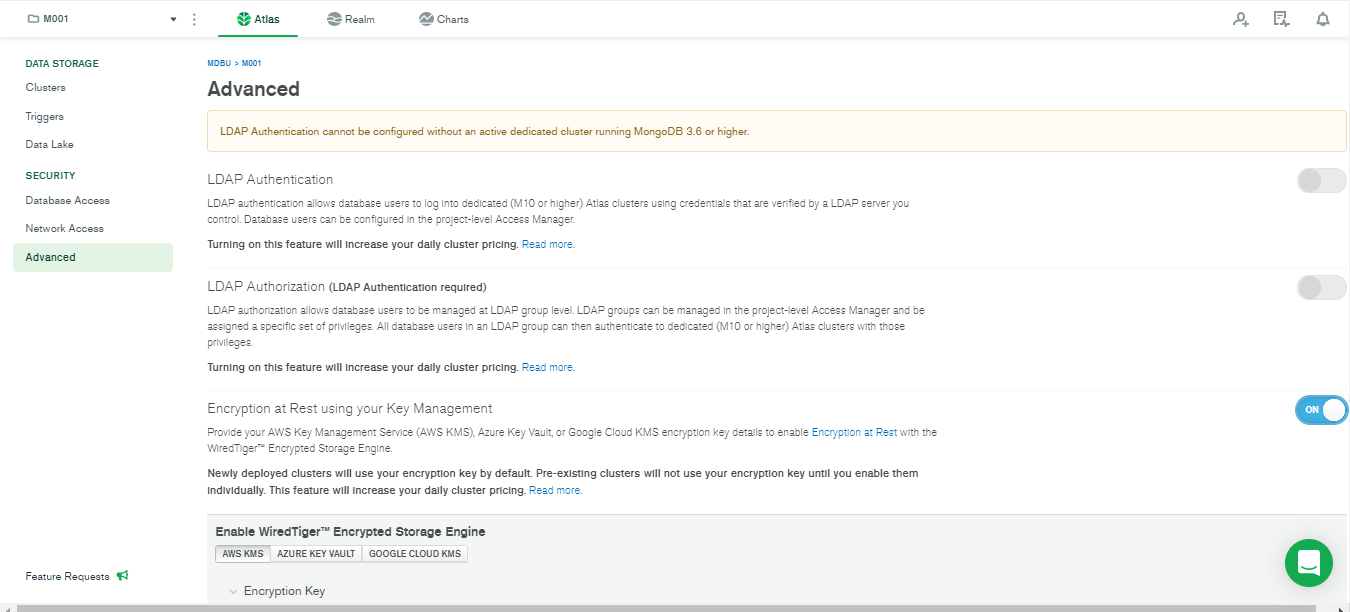
You can turn this on under the Advance section in your MongoDB Atlas and configure KMS based on the cloud provider you use.
Client-Side Field Level Encryption
With MongoDB version 4.2 or higher, you can use compatible MongoDB drivers that provide you with client-side field-level encryption. If you have sensitive data that you don’t even want MongoDB users to have access to, employing Client-Side Field Level Encryption would be the best practice. The data can be encrypted before sending it to MongoDB using a master key. You can generate the master key at the client-side. The data can only be read with the use of the master key.Be careful. In the case that the master key is deleted, all data encrypted using that key is rendered unreadable.You can store the master key on the client’s computer. Alternatively, you can store the key with a trusted third-party enterprise key management solution. The latter is comparatively safer in contrast to storing the master key responsible for reading all your data in your local machine as local machines can be vulnerable in contrast to KMS.To understand more about CSFLE, its drivers, implementation, head over to the official documentation provided by MongoDB.
Rotating encryption keys
Rotating encryption keys means changing the encrypted key that is being used to encrypt and decrypt sensitive data. Most regulatory requirements mandate that a key be rotated out and replaced with a new key once a year. While using MongoDB, you have two ways to do so
KMIP
With KMIP, you just need to rotate the master key.
Use the following syntax to rotate the master key for the secondary members one at a time:
Use rs.stepDown() method to deactivate the primary node. An election will create a new primary node.
rs.stepDown()
Check the status of the nodes using the rs.status() method. If the primary node is indicated to have been stepped down, then you can now rotate its master key.
Restart the stepped-down member including the kmipRotateMasterKey option. This will rotate the master key.
Check the state of the replica set members and make sure it has reached the secondary state. Run the following command to check the state.
rs.status()
When the new node completes its initial sync process, you can use rs.reconfig() to update the newly added secondary’s vote and priority settings.
var cfg = rs.conf();

cfg.members[<array index of new member>].priority = 1;  // Substitute the correct array index for the new member
cfg.members[<array index of new member>].votes = 1;     // Substitute the correct array index for the new member
rs.reconfig(cfg)
Remove the old node from the replica set and delete all its data.
You can read the original documentation provided by MongoDB to get information about specific terms and commands.
In Conclusion, how Secure is MongoDB?
While we use MongoDB our data is protected while in transit and at rest. With capabilities of further encryption, we can see that MongoDB is very secure when it comes to data encryption. There are various methods that are employed by default to protect your data including further encryption. This makes the whole architecture of the database secure and very useful.If you are using MongoDB as your database, you already have encryption enabled to protect your data. Furthermore, you can encrypt it from your client-side if you don’t want MongoDB users, database administrators to see your sensitive information. You can also keep the key in your local device or you can enable a Key Management Solution provided by your cloud (AWS, GCP, or Azure) or use a third-party to ensure that the key is separate and secure. That way, the data will be encrypted in one place and the key will be in another place. And, even if anyone gains access to the data, they won’t be able to decrypt it without the key.After this, the only way your data can be accessed by an unauthorized person is through human error.